Staff QR Attendance — User Guide
Staff mark their own attendance by scanning a single printed QR code with the mobile app. The system records each scan as a punch, pairs punches into work sessions, and at the end of the day converts those sessions into a final Present / Half day / Absent result for every staff member.
1. What the feature does
| Step | Who | What happens |
|---|---|---|
| 1 | School Admin | Configures the feature and generates one QR code for the school |
| 2 | School Admin | Creates shifts and assigns one shift to every staff member |
| 3 | Staff | Opens app → scans the QR at the gate → punch IN recorded |
| 4 | Staff | Scans again when leaving → punch OUT recorded |
| 5 | System | 1 hour after school end time, closes the day and calculates the result |
| 6 | School Admin | Reviews the register, corrects anything wrong, exports reports |
Key ideas:
- Punch ≠ Attendance. A punch is a raw scan event. The attendance status (Present / Half day / Absent) is a separate, calculated record.
- The app decides nothing. Whether the scan is an IN or an OUT, which staff member it belongs to and which date it lands on are all decided by the server. The app only sends the scanned token, the device GPS coordinates and a scan id.
- One QR code per school, forever. The token never rotates, so a printed poster never has to be replaced. Only its validity end date changes.
2. Prerequisites (must be in place before enabling)
The settings screen shows a Readiness checklist. The feature cannot be switched on until every item passes.
| # | Requirement | Where to set it |
|---|---|---|
| 1 | Staff Attendance Management feature must be active in the school's package | Super Admin → Package |
| 2 | School start & end time | QR Attendance Settings |
| 3 | School location (latitude / longitude) | QR Attendance Settings (map picker) |
| 4 | Allowed radius (10–5000 m) | QR Attendance Settings |
| 5 | Working hours calculation mode | QR Attendance Settings |
| 6 | At least one active shift | Shift master (Shift menu) |
| 7 | Valid full-day / half-day thresholds on every active shift | Shift master |
| 8 | Every active staff member has a shift assigned | Manage Teacher / Manage Staff form |
| 9 | QR code generated | QR Attendance Settings |
Also needed operationally:
- The Laravel scheduler must be running (
php artisan schedule:runin cron) — without it nothing is ever finalized. - A queue worker must be running if you want the missing-punch-out email.
- Google Maps API key (optional) — only to show the map picker on the settings screen. Without it you type coordinates manually.
- Staff must have the mobile app, be logged in, and grant location permission.
Permissions
| Permission | Grants access to |
|---|---|
staff-attendance-list | Today's Attendance, Attendance Register, Detail page, Reports |
staff-attendance-edit | Manual correction of a finalized day |
qr-attendance-settings | QR Attendance Settings screen, QR generation, end-date change |
3. Setup guide
Step 1 — Create shifts
Menu: Shift
Each shift needs:
| Field | Meaning |
|---|---|
| Name | e.g. Morning Shift |
| Start time / End time | The shift window. Overnight shifts are not supported — end must be after start. |
| Full day minutes | Counted minutes needed for a Present |
| Half day minutes | Counted minutes needed for a Half day |
Rules enforced: half_day_minutes < full_day_minutes ≤ shift duration, both above zero.
Example: shift 09:00–17:00 (480 min), full day = 420, half day = 210.
Step 2 — Assign a shift to each staff member
There is no separate assignment screen. The shift dropdown sits inside the Manage Teacher and Manage Staff add/edit forms.
- One staff member holds one shift at a time.
- Changing a shift closes the current assignment (the day before the new one starts) and opens a new one. Days already finalized keep the shift they were calculated with.
- Clearing the shift closes the current assignment without opening a new one.
Staff with no shift cannot punch — their scan is rejected with "shift not configured".
Step 3 — Configure QR Attendance Settings
Menu: QR Attendance Settings
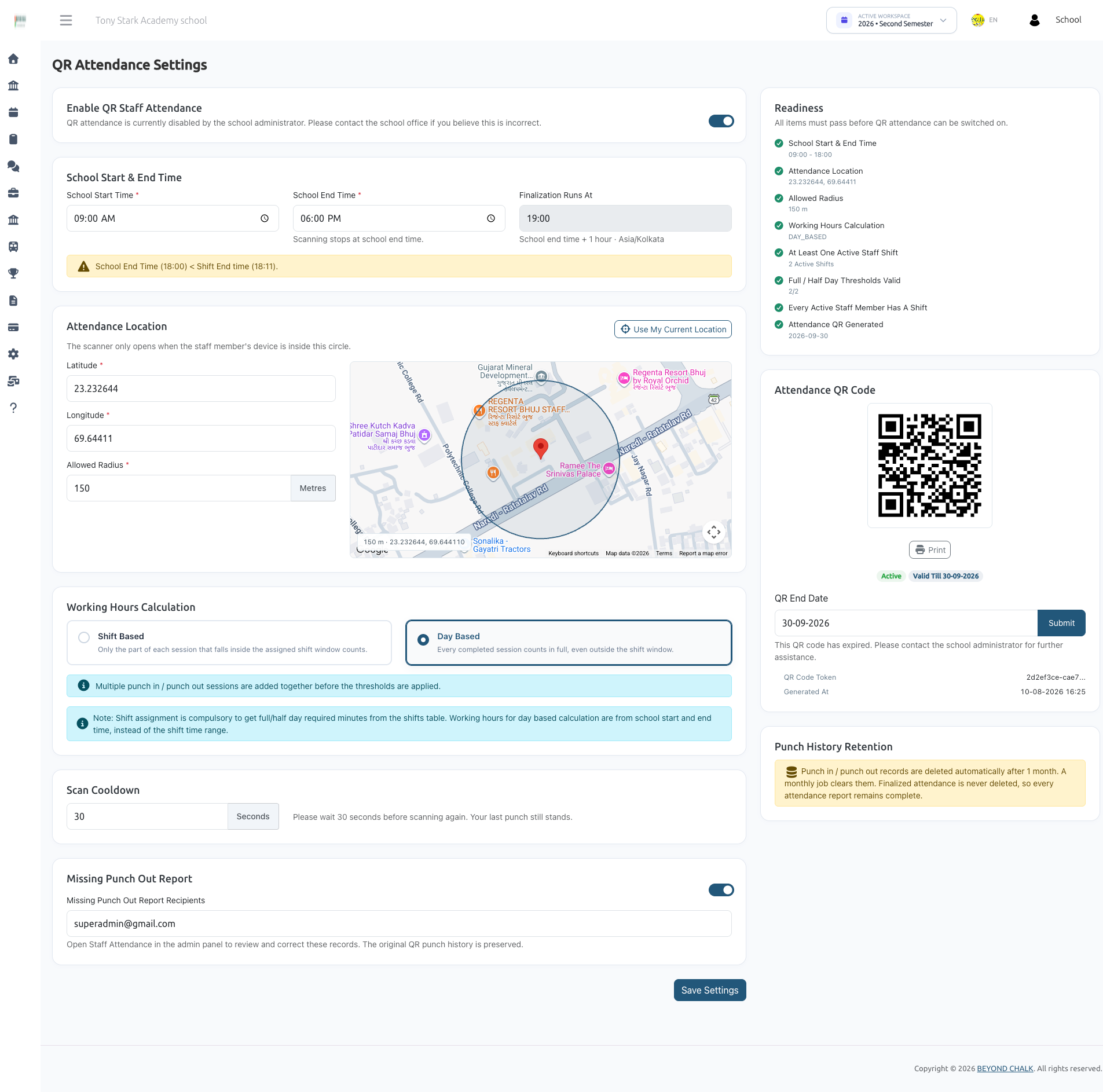
| Setting | Validation | Notes |
|---|---|---|
| Enable QR Attendance | boolean | Gated on the readiness checklist |
| School start time | HH:MM | Informational for the app |
| School end time | HH:MM, after start | Scanning stops after this time; also drives finalization |
| Latitude / Longitude | -90..90 / -180..180 | The school's centre point |
| Allowed radius | 10–5000 metres | Device must be within this distance |
| Calculation mode | SHIFT_BASED or DAY_BASED | See §5 |
| Cooldown seconds | 0–600 (default 30) | Minimum gap between two scans by the same person |
| Notify missing punch out | boolean | Sends the daily email |
| Notification emails | comma-separated | Falls back to all School Admins when empty |
| Google Maps API key | optional | Only powers the map picker |
If you tick Enable while something is still missing, the system saves the rest of the settings, forces the switch back off, and tells you exactly which checklist items failed.
Step 4 — Generate and print the QR code
On the same settings screen:
- Generate QR Code — creates the school's single code (a UUID token). Optionally set an end date.
- The code is rendered on screen with a Print button. Print it and put it at the entrance.
- QR end date can be extended at any time. The token is untouched, so the printed poster keeps working.
- Generating again is refused while an active code exists — there is only ever one per school.
4. Daily use
For staff (mobile app)
- Open the QR attendance screen. The app loads config: enabled flag, school coordinates, radius, cooldown, and today's status.
- Scan the QR at the gate.
- The app sends the token + GPS coordinates. The server replies with whether it recorded a punch in or a punch out, the distance, and the working minutes so far.
- Scan again when leaving. Multiple in/out pairs per day are fine (lunch break, field visit, etc.).
The app also shows: today's sessions, current on-duty state, what the next scan will do, and the staff member's own attendance history.
Why a scan can be refused
| Message | Error code | Cause |
|---|---|---|
| QR attendance disabled | qr_disabled | Feature switched off for the school |
| Configuration incomplete | not_configured | A readiness item is failing |
| QR code invalid | qr_invalid | Token not found, or belongs to another school |
| QR code expired | qr_expired | Past the code's end date |
| QR code inactive | qr_inactive | Code status is disabled |
| Shift not configured | shift_missing | No shift assignment in force for that staff member on that date |
| Outside allowed location | outside_radius | Distance > radius (distance and radius are returned in the message) |
| Unable to determine location | location_unavailable | The device sent no GPS coordinates |
| Attendance for today is closed | day_closed | Scan attempted after school end time |
| Please wait before scanning again | cooldown | Within the cooldown window; remaining seconds are returned |
| Not eligible | staff_not_eligible | Inactive user, or a user with no school |
Duplicate protection: the app sends a request_uuid with each scan. If the response is lost and the app retries, the server returns the original punch instead of creating a second one.
Concurrency: the day's punches are row-locked during a punch, so two simultaneous scans can never both insert an IN.
For admins (web)
See the related pages for in-depth looks at:
- Today's Attendance
- Attendance Register
- Attendance Reports
All screens filter by date (default = today in the school's timezone) and by staff type.
5. How the calculation works
Sessions
Punches for the day are sorted by time and paired in order:
IN → OUT= one completed session.- An
INwhile another IN is still open leaves the earlier one unmatched (reported, never auto-closed). - An
OUTwith no open IN is ignored for calculation but stays in the punch log. - Only completed sessions contribute working time. Gaps between sessions (breaks) are automatically excluded because only the sessions themselves are summed.
Calculation mode
| Mode | Counted minutes |
|---|---|
SHIFT_BASED (default) | Only the part of each session that overlaps the shift window: max(punch_in, shift_start) → min(punch_out, shift_end). Early arrival and overtime do not count. Without a shift, nothing counts. |
DAY_BASED | The full length of every completed session, whatever the clock time. |
Everything is in whole minutes — never decimal hours. 4h 59m 59s is a half day, not a full day.
Status decision
Against the shift's thresholds, using counted minutes:
| Condition | Result |
|---|---|
working ≥ full_day_minutes | Present (1) |
| First half ≥ half-day threshold, second half below | First half present (4) |
| Second half ≥ half-day threshold, first half below | Second half present (5) |
working ≥ half_day_minutes | Half day (2) |
| Otherwise | Absent (0) |
| Date is a school holiday | Holiday (3) |
The "first half / second half" split uses the midpoint of the shift window.
Boundaries are inclusive at the bottom: exactly the full-day requirement is a full day. If a shift has no full-day threshold, any recorded work counts as Present.
6. End-of-day finalization
- Runs automatically school end time + 1 hour (shown on the Today screen as the finalization time).
- The scheduler checks every minute, so schools in different regions and timezones each close at their own local time.
- Safe to run repeatedly. One attendance row per staff member per date.
- Eligible staff = active users with the Teacher or Staff role.
What finalization writes per staff member: status, working minutes, completed/incomplete session counts, and a snapshot of the shift (name, start, end, thresholds, calculation mode). The snapshot means later shift edits never rewrite a finished day.
Precedence rules:
- A manually corrected day is never overwritten — it is the admin's decision.
- Holiday overrides everything.
- If a staff member has approved leave for the date and zero working minutes, the row is skipped and left to the leave module.
- Otherwise, when the result is Absent / Half day / First half / Second half and no leave exists, an auto-generated leave record is created for that date (Full / Half / First Half / Second Half accordingly).
- An unmatched punch in is never closed with an invented time — it is reported instead.
Missing punch-out email
When any staff member ends the day with an unmatched punch in, one consolidated email per school per day is queued to the configured recipients (or all School Admins), listing name, staff type, shift, punch-in time, working minutes and resulting status. No automatic punch out is ever created — the admin resolves each case by hand.
Manual command (for support / catch-up)
php artisan staff-attendance:finalize                      # all due schools, today
php artisan staff-attendance:finalize --school=3           # one school
php artisan staff-attendance:finalize --date=2026-08-25    # a specific date
php artisan staff-attendance:finalize --force              # ignore the due-time check
A failure in one school never stops the rest; it is logged and skipped.
7. Manual correction
On the Staff Day Detail page (needs staff-attendance-edit).
| Field | Required | Notes |
|---|---|---|
| Status | yes | 0 Absent / 1 Present / 2 Half day / 3 Holiday |
| Working minutes | no | 0–1440. Left blank = keep existing value |
| Reason | yes | max 255 chars |
| Note | no | max 1000 chars |
What happens:
- A new final result is written and the row's source becomes
MANUAL. - An audit row is stored: old status, new status, old minutes, new minutes, reason, note, who changed it, when.
- The raw punches are never touched.
- The day is now protected from being overwritten by any later finalization run.
Correction history appears on the detail page and in the Corrections report tab.
8. Data retention
- Raw punch rows are deleted after 1 month, by a job that runs on the 1st of every month at 01:00 (
staff-attendance:purge-punches, chunked in batches of 1000). - Finalized attendance is never deleted — status, working minutes, shift snapshot and every correction stay permanently.
Consequence: the Punch log report tab and the app's own punch list legitimately come back empty for older dates, even though the attendance for those dates still exists. The reports screen shows the earliest date raw punches still reach back to.
Override the window when needed:
php artisan staff-attendance:purge-punches --months=3
php artisan staff-attendance:purge-punches --school=3
9. Mobile API reference
All endpoints sit under /api/staff/qr-attendance and require an authenticated staff token.
| Method | Endpoint | Purpose |
|---|---|---|
| GET | config | Enabled flag, school coordinates, radius, cooldown, school times, calculation mode, and today's status |
| POST | punch | Record a scan |
| GET | today | Today's own sessions, on-duty state, next action |
| GET | my-attendance | Own finalized history (from_date, to_date; defaults to the current month) plus a summary |
| GET | punches | Own raw punch log for one date |
POST punch request
| Field | Rule |
|---|---|
qr_token | required, string — the scanned token |
latitude | required, numeric, -90..90 |
longitude | required, numeric, -180..180 |
request_uuid | optional, uuid — makes a retry idempotent |
POST punch response data
punch_type (IN/OUT), punched_at, distance (metres), next_action, working_minutes, sessions, duplicate.
On a business refusal the response carries the readable message plus an error_code from the table in §4 so the app can branch on it.
10. Data model
| Table | Holds |
|---|---|
shifts | Shift master + full_day_minutes, half_day_minutes |
staff_shift_assignments | Effective-dated shift history per staff member (effective_from, effective_to; NULL = ongoing) |
staff_attendance_qr_codes | The school's single QR token, status, end date |
staff_attendance_punches | Raw scan events: type, timestamp, lat/lng, distance, QR used, request uuid |
staff_attendances | The finalized result + shift snapshot + source + finalized_at |
staff_attendance_corrections | Audit trail of every manual override |
Settings live as key/value rows in school_settings under the qr_attendance_* prefix — no separate settings table.
All timestamps and dates are resolved in the school's own timezone (school setting time_zone, falling back to the system setting), never the raw PHP server timezone.
11. Troubleshooting
| Symptom | Cause / fix |
|---|---|
| Enable switch keeps turning itself off | A readiness item is failing — the error message names it |
| Staff gets "Shift not configured" | No shift assignment in force. Assign one in Manage Teacher / Manage Staff |
| Staff gets "Outside allowed location" | Device is beyond the radius. Check the school coordinates, or widen the radius |
| Staff gets "Unable to determine your location" | Location permission denied, or GPS off on the device |
| Scan rejected in the evening | Past school end time — scanning is closed. Fix by manual correction |
| Nothing is finalized | The Laravel scheduler is not running in cron |
| Everyone marked Absent despite scans | Calculation mode is SHIFT_BASED and the punches fall outside the shift window, or the shift thresholds are wrong |
| Missing punch-out email never arrives | The notification toggle is off, no valid recipients configured, or the queue worker is not running |
| Punch log empty for an older date | Expected — raw punches only reach back one month. The finalized attendance is still there |
| Today's screen shows staff without a shift | The counter on that screen tells you how many; assign shifts to them |