Fees Module — Payments, Manual Payment & Cheque Status
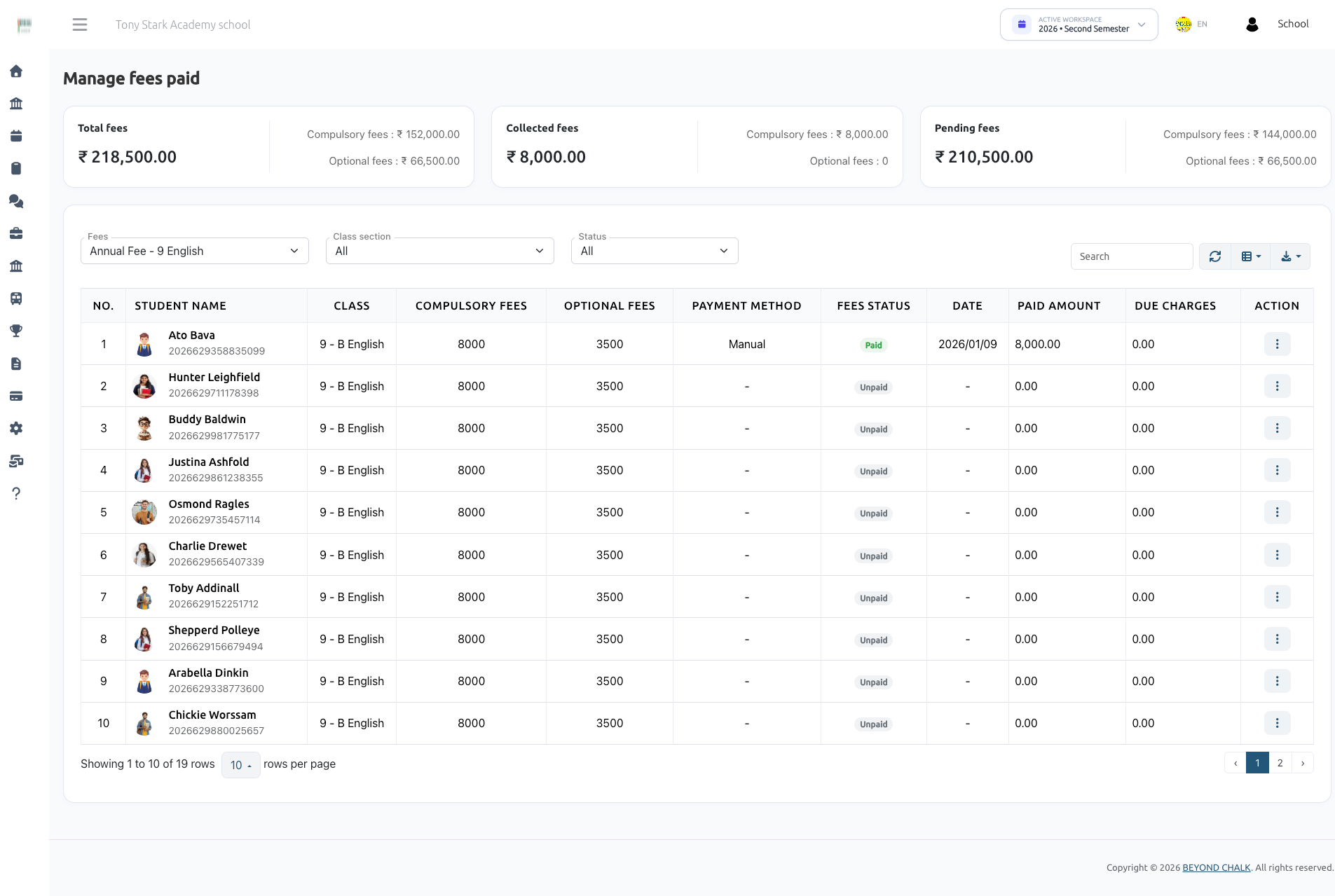
How fees get collected in eSchool SaaS, with focus on offline payments, manual submissions, and the unified cheque and payment reconciliation workflow:
- Manual payment — the parent pays by bank transfer / UPI / QR outside the system, uploads a receipt from the mobile app, and the school approves or rejects it.
- Cheque and manual payment lifecycle — carries a real status (
Pending→SuccessorFailed) instead of being recorded as paid immediately. - Multi-fee & multi-installment cheque reconciliation — a single cheque or manual payment can cover multiple installments or multiple optional fee components; they are grouped together and reconciled atomically in one action.
- Unified status management modal — a modern card-based interface used across both Compulsory and Optional fees to review payment details, fees covered, uploaded proofs, and update status.
1. The two fee types
| Type | Table | Meaning |
|---|---|---|
| Compulsory fees | compulsory_fees | The mandatory fee for the class. Can be a single full payment or split into installments. |
| Optional fees | optional_fees | Add-on components (transport, activity, lab, etc.) the guardian picks individually. |
Both write per-transaction rows and roll up into one summary row per student per fee in fees_paid (amount, is_fully_paid).
2. Payment modes & references
| Mode | Stored Value | Recorded by | Initial status | Identifier |
|---|---|---|---|---|
| Cash | Cash (1) | Admin, offline collection screen | Success immediately | Cash transaction |
| Cheque | Cheque (2) | Admin, offline collection screen | Admin picks: Under review (Pending), Paid (Success), or Bounced (Failed) | Cheque Number (cheque_no) |
| Online | Online | Parent, via Stripe / Razorpay / Paystack / Flutterwave | Success on gateway webhook | Gateway Payment ID |
| Manual | Manual | Parent, mobile app — pays outside system and uploads proof | Always Pending until admin review | Reference Number (MANUAL-YYYYMMDD-XXXX on payment_transactions.order_id) |
modeoncompulsory_feesandoptional_feesis an ENUM('Cash','Cheque','Online','Manual').- The offline collection forms post the numeric mode (
1= Cash,2= Cheque); the model accessors and controllers handle both numeric and string values. - Parents never supply a cheque number for manual submissions:
cheque_noremainsNULL, and the payment is identified system-wide by the generatedpayment_reference(MANUAL-YYYYMMDD-XXXX).
3. The status model
Both compulsory_fees.status and optional_fees.status share the same three database values (defined as constants on CompulsoryFee.php and OptionalFee.php):
| Constant | DB value | Cheque meaning & UI label | Manual meaning & UI label |
|---|---|---|---|
CHEQUE_PENDING / MANUAL_UNDER_REVIEW | Pending | Cheque deposited, not cleared (Under Review) | Receipt uploaded, awaiting verification (Under Review) |
CHEQUE_SUCCESS / MANUAL_APPROVED | Success | Cheque cleared (Paid) | Payment verified & approved (Approved) |
CHEQUE_FAILED / MANUAL_REJECTED | Failed | Cheque bounced (Bounced) | Payment rejected (Rejected) |
Money calculation rule
Only Success counts as money.
Every balance, "paid amount", progress bar, fees_paid.amount and is_fully_paid calculation strictly sums rows where status = 'Success' and deleted_at IS NULL.
- A
Pendingrow is visible in records and review queues but contributes 0.00 to the collected balance. - A
Failedrow contributes 0.00 and re-opens the fee/component for a fresh collection attempt.
Money Rules Worth Remembering
- Every "paid" figure = sum of
status = 'Success',deleted_at IS NULLrows. Nothing else counts. - Discounts are applied before payment: the net payable is
fee − discount, and the overpayment guard uses the net figure. - Due charges are computed at payment time (percentage or fixed, only when past the due date) and are allocated before the base amount.
- Overpayment is refused: on the final installment a surplus throws an error, and non-installment payment is capped at the outstanding total.
- A fee is fully paid when the
Successtotal reaches the net fee — and, for installment fees, every installment has at least oneSuccessrow.
UI Form Values & Validation
The web interfaces submit lowercase status tokens mapped by controllers:
| UI Key | Stored DB Status | Rejection Reason Requirement |
|---|---|---|
pending | Pending | Not required; cleared if previously set |
success | Success | Not required; cleared if previously set |
bounced | Failed | Mandatory (reason on compulsory, rejection_reason on optional) |
Supporting Columns
| Column | Purpose |
|---|---|
notes | Free-form note — parent's remarks on manual submission, or admin's notes |
reason | Rejection / bounce reason. Stored when status is Failed (bounced), cleared otherwise |
payment_transaction_id | Links to the parent payment_transactions audit row |
morph files row | The uploaded payment proof (accessible via receipt_url) |
A synchronized payment_transactions record is maintained with payment_gateway (cheque / manual / cash), payment_status (pending / succeed / failed), and total aggregated amount.
4. Setup — enabling manual payment
Settings → Payment Settings → Manual tab (school admin only; hidden for Super Admin).
| Field | Description |
|---|---|
| Status | Enable / Disable toggle. Manual payments are rejected if disabled (0) |
| Bank Details & Payment Instructions | Rich text (bank name, account number, IFSC/SWIFT, UPI ID, instructions). Shown in app |
| QR code image | Uploaded image file, stored as a morph files record on the payment configuration |
Saved into payment_configurations with payment_method = 'Manual' (details column + attached file). The mobile app retrieves this via GET /api/parent/fees/manual/config.
Permissions
| Permission | Grants |
|---|---|
fees-paid | Collect fees offline, view payment histories, review cheque/manual status, delete transactions |
fees-create / fees-edit / fees-delete | Manage fee types, installments, and master fee setup |
fees-config | Configure payment methods and payment settings |
The module also requires the Fees Management package feature active on the school workspace.
5. Flow A — Admin collects offline (cash / cheque)
1. Compulsory Fees Collection
Screen: Institutional Finance → Fees → Paid → Compulsory Fees (pay-compulsory.blade.php)
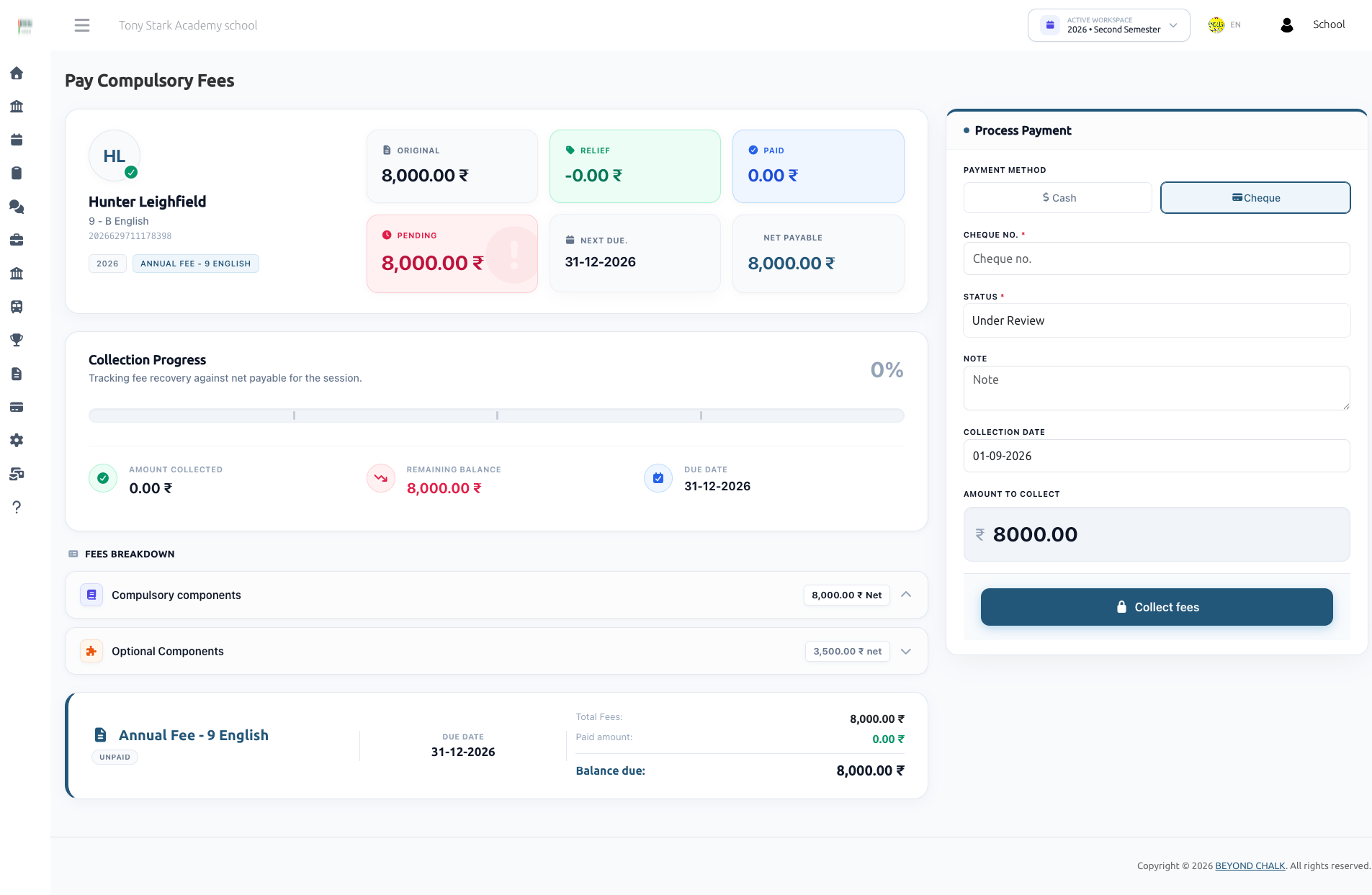
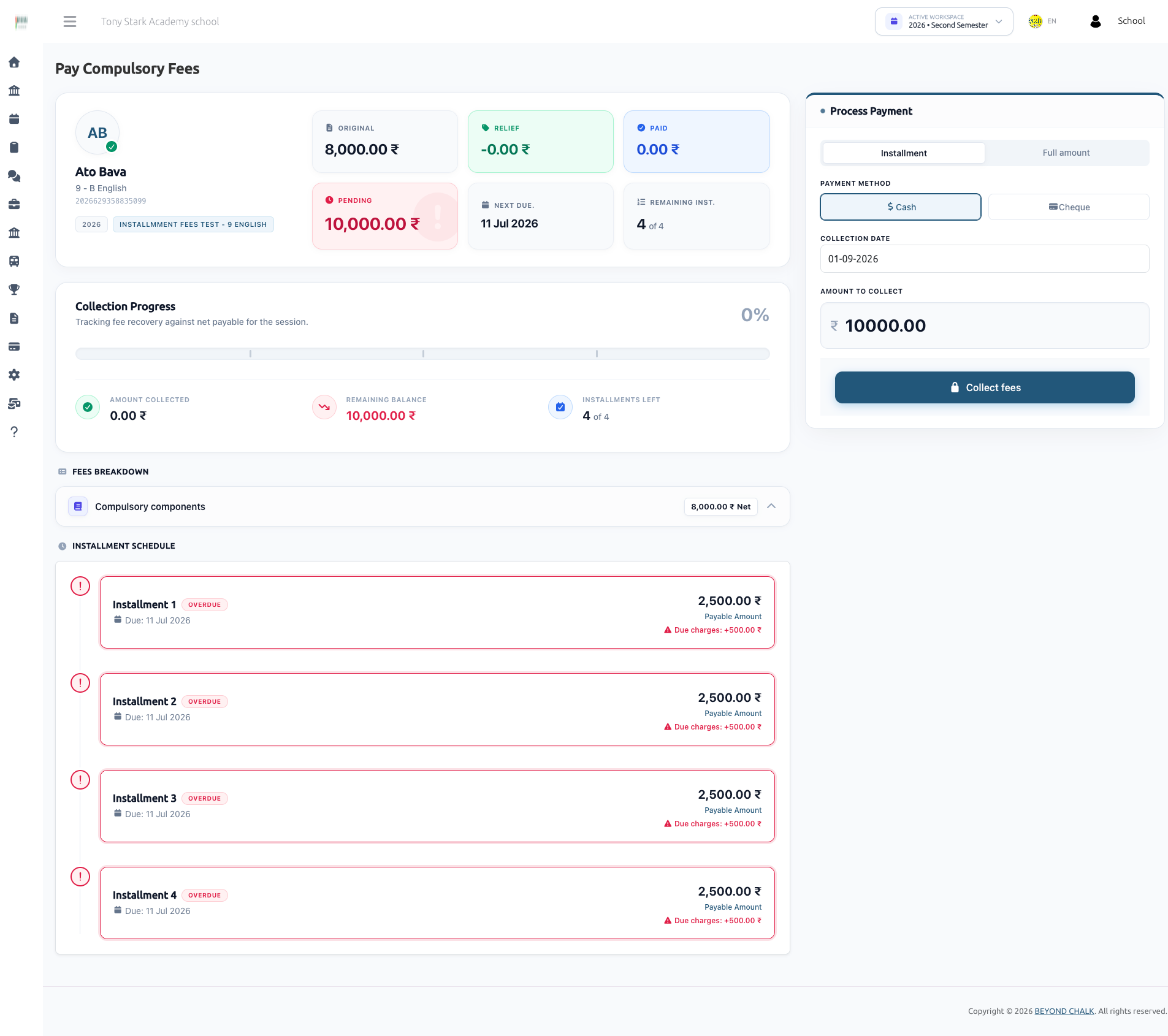
- Admin selects Installment or Full amount.
- Selects Cash or Cheque:
- Cash: Creates transactions immediately with
status = 'Success'. - Cheque: Reveals Cheque Number (required), initial status picker (Under Review / Paid / Bounced), Rejection Reason (mandatory if Bounced), and Note.
- Cash: Creates transactions immediately with
- Enters collection date and amount, then submits.
Multi-Installment Cheque Collection & Review:
- When a single cheque pays multiple installments, the system writes one
compulsory_feesrow per installment touched, all sharing the samecheque_no, collection date, andfees_paid_id. - If an installment fee has an existing
Pendingcheque, the screen automatically detects all sibling transactions (chequeGroupTxns), displays the Fees covered by this cheque breakdown, sets the amount input to the grouped total (read-only), and switches the form action tofees.paid.update-cheque-status. - Payment Lock: New offline collections and online/manual submissions are locked while any
Pendingcheque or manual transaction exists for that fee.
Server-side processing (payCompulsoryFeesStore):
-
Rejects amounts below the minimum payable or exceeding net outstanding balance.
-
Allocates funds installment by installment: due charges first, then base installment amount.
-
Writes
compulsory_feesrows with status derived from the mode. -
Recalculates
fees_paid.amountandis_fully_paidfromSuccessrows only. -
Sends in-app and WhatsApp receipts only when cleared (
Success). -
Note on Installments: Installments are not allowed for optional fees.
-
Advance Payments: School admin/user can pay extra amount along with the installment amount. If the installment amount is paid, only advance amount can be paid in the installment duration.
2. Optional Fees Collection
Screen: Institutional Finance → Fees → Optional Fee → Pay Optional (pay-optional.blade.php)

The optional fees payment screen features a modern split-panel layout:
- Left Panel (Fee Selection): Lists all available optional components for the student with their base amount, relief discounts, and net payable amount.
- Badges indicate status:
Paid(green),Pending(amber),Bounced - Retry Payment(red), andDiscounted(blue). - Components already
PaidorPendinghave disabled checkboxes. Paid rows display a Remove button; pending rows display a Cancel button. - Bounced components are re-enabled with a "Bounced — Retry Payment" badge, allowing immediate re-collection.
- Badges indicate status:
- Right Panel (Process Payment): Sticky payment panel providing a live summary of selected fees:
- Datepicker for collection date.
- Selected fee itemization with live total amount calculation.
- Payment Mode toggle: Cash vs Cheque.
- Cheque Fields (when Cheque is selected):
- Informational alert: "This status will be applied to all fees paid by this cheque."
- Cheque Number input (required).
- Status Segmented Control: Under Review (
pending), Paid (success), or Bounced (bounced). - Rejection Reason: Dynamically appears and becomes required when Bounced is chosen.
- Note textarea.
- Pay Now CTA button.
Server-side processing (payOptionalFeesStore):
- Shared Cheque Transaction: When multiple optional fees are paid via a single cheque, they share a single
PaymentTransactionrecord (payment_gateway = 'cheque',payment_status = 'pending'|'succeed'|'failed') with the combined total amount. - Validates against duplicate submissions for components already
PendingorSuccess. - Enforces net amount ceilings (amount − discounts) to prevent overpayment.
- Inserts
optional_feesrows in bulk viacreateBulk. - If bounced, sends an instant notification containing the bounce reason to the parent/guardian.
- On success, dispatches a WhatsApp fee receipt and in-app payment notification.
6. Flow B — Parent pays manually from the mobile app
- Parent opens the mobile app, views bank details and QR code via
GET /api/parent/fees/manual/config. - Parent makes an external transfer (bank wire, UPI, or cash deposit).
- Parent submits
POST /api/parent/fees/manual/compulsory/payorPOST /api/parent/fees/manual/optional/paywith the receipt image and an optional note. - Server calculates the payable amount:
- Compulsory installment mode:
net installment amount − already-paid amount+ due charges (if past due date). - Compulsory full mode:
total compulsory fee − discounts − already paid+ due charges. - Optional fees:
sum(component amount − discount − already paid).
- Compulsory installment mode:
- Reference & Transaction Creation (
ManualPaymentService.php):- System generates a unique internal reference:
MANUAL-YYYYMMDD-XXXX(e.g.MANUAL-20260902-A1B2). - Creates a single
PaymentTransaction(payment_gateway = 'manual',order_id = $reference,payment_status = 'pending'). - Attaches the receipt file as a morph
filesrecord to thePaymentTransaction. - Creates one
compulsory_feesoroptional_feesrow per installment or component withmode = 'Manual',status = 'Pending',cheque_no = null, andpayment_transaction_id = $paymentTransaction->id.
- System generates a unique internal reference:
- Nothing is added to
fees_paid.amountuntil an admin reviews and approves the submission.
Guards Enforced Before Creation
| Guard | Response |
|---|---|
| Manual payment disabled for the school | "Manual payment is currently disabled for this school." |
| Child not active / not linked to this guardian | "Child's Account is not Active…" |
| Fee already fully paid | "Fees Already Paid" |
A Cheque or Manual transaction is already Pending for this fee | "A cheque/manual payment for this fee is currently under review. New payments are locked until it is cleared or rejected." |
| Optional component already under review or already paid | Locked with the matching message |
| Computed payable amount is zero | "This fee has already been paid." |
Receipt upload: required|file|max:5120 (5 MB), stored via upload service.
The parent can poll GET /api/parent/fees/manual/status for a record's current status, mode, amount, note, and receipt URL.
7. Flow C — Admin reviews a pending payment (Unified Modal)
Pending cheque and manual payments can be reviewed from two main entry points:
- The Compulsory Pay Screen (
pay-compulsory.blade.php): Automatically switches into review mode when pending transactions exist for that student and fee. - The Fees List Screens:
- Compulsory Fees List (
fees_paid.blade.php): Click the Update Status button on any row holding a pending cheque or manual payment. - Optional Fees List (
optional-fees.blade.php): Click the Update Status button on any row holding a pending optional fee transaction.
- Compulsory Fees List (
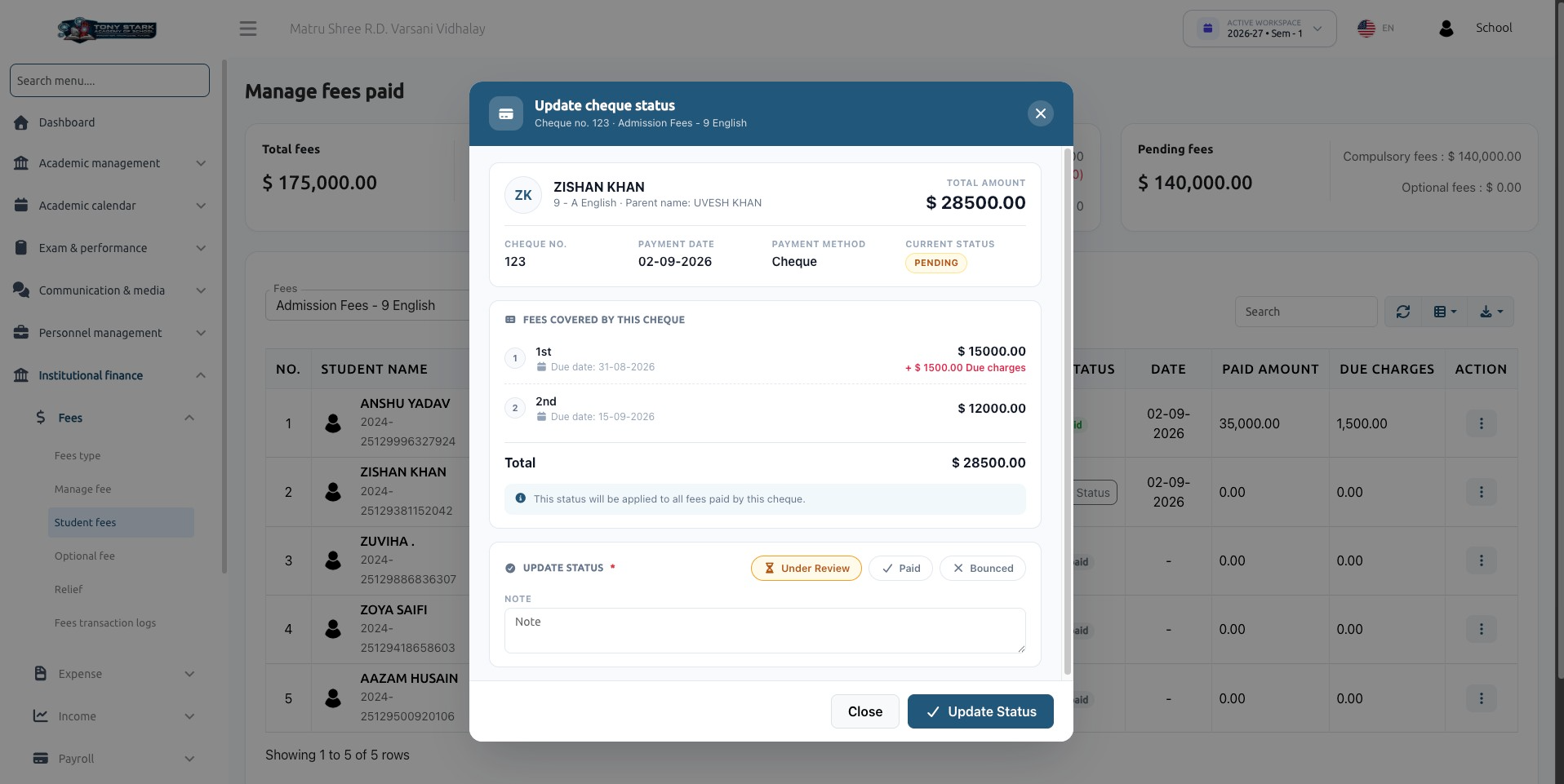
Both list screens open the Unified Cheque & Payment Status Modal:
┌─────────────────────────────────────────────────────────────────────────────┐
│ 💳  UPDATE CHEQUE STATUS                                                  ✕ │
│     Cheque no. 123 · Admission Fees · 9 English                             │
├─────────────────────────────────────────────────────────────────────────────┤
│ ┌─────────────────────────────────────────────────────────────────────────┐ │
│ │ (ZK)  ZISHAN KHAN                                     TOTAL AMOUNT      │ │
│ │       9 - A English · Parent name: UVESH KHAN           $ 28,500.00     │ │
│ │                                                                         │ │
│ │ CHEQUE NO.       PAYMENT DATE      PAYMENT METHOD     CURRENT STATUS    │ │
│ │ 123              02-09-2026        Cheque             [ PENDING ]       │ │
│ └─────────────────────────────────────────────────────────────────────────┘ │
│                                                                             │
│ 📋  FEES COVERED BY THIS CHEQUE                                             │
│ ┌─────────────────────────────────────────────────────────────────────────┐ │
│ │ ①  1st Installment (Due: 31-08-2026)             $ 15,000.00            │ │
│ │                                               + $ 1,500.00 Due charges  │ │
│ │ ②  2nd Installment (Due: 15-09-2026)             $ 12,000.00            │ │
│ │ ─────────────────────────────────────────────────────────────────────── │ │
│ │ Total                                            $ 28,500.00            │ │
│ └─────────────────────────────────────────────────────────────────────────┘ │
│ ℹ This status will be applied to all fees paid by this cheque.             │
│                                                                             │
│ 🔘  UPDATE STATUS *                                                         │
│     [ ⌛ Under Review ]    [ ✓ Paid ]    [ ✕ Bounced ]                     │
│                                                                             │
│ [ Reason for Rejection * (visible only when Bounced/Rejected is selected) ] │
│                                                                             │
│ Note                                                                        │
│ ┌─────────────────────────────────────────────────────────────────────────┐ │
│ │                                                                         │ │
│ └─────────────────────────────────────────────────────────────────────────┘ │
│                                                                             │
│ 📎 Uploaded Payment Receipt (Manual payments only)                          │
│    [ 📄 View Full Receipt ]                                                 │
├─────────────────────────────────────────────────────────────────────────────┤
│                                                [ Close ]  [ Update Status ] │
└─────────────────────────────────────────────────────────────────────────────┘
Dynamic Modal Adaptation (Cheque vs. Manual)
The modal javascript dynamically adapts labels and fields based on mode:
| Element | Cheque Payment | Manual Payment |
|---|---|---|
| Header Icon | fa fa-credit-card | fa fa-file-text |
| Modal Title | Update cheque status | Update payment status / Update Manual Payment Status |
| Subtitle Identifier | Cheque no. {number} · {fee_name} | {reference_no} · {fee_name} |
| Identifier Label | Cheque No. | Reference No. |
| Covered Section Title | Fees Covered By This Cheque / Optional Fees Covered By This Cheque | Payment Details |
| Success Status Option | Paid | Approved |
| Failure Status Option | Bounced | Rejected |
| Rejection Reason Label | Cheque Bounced Reason | Reason for Rejection |
| Receipt Link | Hidden (or optional if uploaded) | Visible link to view uploaded proof file |
Multi-Installment & Multi-Component Grouping Engine
Payments covering multiple installments or components are linked behind the scenes so the admin never has to update each item separately:
flowchart TD
    A[Admin opens Modal or Pay Screen] --> B{Payment Mode}
    B -->|Cheque| C[chequeGroupBuilder / optionalChequeGroupBuilder]
    B -->|Manual| D[GroupBy payment_transaction_id]

    C --> E[Find all sibling rows matching: student_id + cheque_no + date + fees_paid_id]
    D --> E

    E --> F[GET cheque-details endpoint returns grouped payload]
    F --> G[Modal renders itemized breakdown & combined total]

    G --> H[Admin selects Under Review / Paid / Bounced & submits]
    H --> I[POST update-cheque-status with comma-separated IDs]

    I --> J[Atomic DB Transaction]
    J --> K[CompulsoryFee / OptionalFee update in bulk]
    J --> L[syncOfflinePaymentTransactions: update shared PaymentTransaction]
    J --> M[recalculateFeesPaidSummary: update fees_paid total & is_fully_paid]
    J --> N[Send single consolidated notification + WhatsApp receipt]
Backend Group Query Builders:
chequeGroupBuilder(CompulsoryFee $fee)(FeesController.php):- For
Manual: Groups all rows matchingpayment_transaction_id. - For
Cheque: Groups all rows matchingstudent_id,mode = 'Cheque',cheque_no,date, andfees_paid_id.
- For
optionalChequeGroupBuilder(OptionalFee $fee)(FeesController.php):- Mirrors compulsory grouping for optional fee components paid under the same cheque or manual transaction.
API Endpoints:
GET fees-paid/cheque-details/{id}(FeesController::chequeGroupDetails): Returns full grouped payload for compulsory fees.POST fees-paid/update-cheque-status(FeesController::updateChequeStatus): Atomic update for compulsory fees.GET fees/optional/cheque-details/{id}(FeesController::optionalChequeGroupDetails): Returns full grouped payload for optional fees.POST fees/optional/update-cheque-status(FeesController::updateOptionalChequeStatus): Atomic update for optional fees.
What each decision does
When updating status (updateChequeStatus or updateOptionalChequeStatus), all covered rows are processed together inside a database transaction:
| Decision | Actions taken by the system |
|---|---|
Approve / Paid (success) | 1. All covered fee rows updated to status = 'Success'.2. Linked payment_transactions record updated to payment_status = 'succeed' with the combined total.3. fees_paid.amount and is_fully_paid recalculated from Success rows.4. Guardian & student receive one notification ("Manual Payment Approved" / "Cheque is cleared"). 5. WhatsApp fee receipt with PDF generated and delivered. |
Reject / Bounced (bounced) | 1. All covered fee rows updated to status = 'Failed' and reason recorded.2. Linked payment_transactions record updated to payment_status = 'failed'.3. Balance remains unchanged (amount was never counted). 4. Fee re-opens immediately for a new payment attempt. 5. Guardian & student receive one notification with the rejection reason. |
Keep Under Review (pending) | 1. Status remains Pending.2. Admin note updated. 3. Linked transaction remains pending.4. No notifications dispatched. |
8. Locking rules — the short version
- Compulsory Fee Lock: A single
Pendingtransaction (cheque or manual) locks the entire compulsory fee for that student. Neither new admin collections nor new mobile manual submissions can be made until the pending payment is resolved. - Optional Fee Lock: An individual optional component is locked while it is
PendingorSuccess. Other components remain selectable. - Retry on Failure: When a cheque bounces or a manual payment is rejected, the transaction status becomes
Failed. The fee/component is automatically unlocked without needing to delete the failed record; the next collection simply creates a new transaction row. - Cancellation: Admins can cancel a pending optional fee directly using the Cancel button on
pay-optional.blade.php, which permanently deletes the pending row and clears any associated lock.
9. What the parent and admin see
Pay Compulsory Screen
- Overview Card: Shows Original Fee, Relief (Discounts), Paid Amount, Pending Amount, Next Due Date, and Collection Progress Bar.
- Component Breakdown: Installment timeline with status badges (
Paid,Partial,Overdue,Next due,Upcoming,Discounted). - Cheque Review Mode: If a pending cheque covers multiple installments, the "Fees covered by this cheque" panel displays the itemized list, locks the amount, and sets the CTA button to
Update Cheque Status.
Pay Optional Screen
- Fee Selection: Left panel showing all optional components with net amounts and status badges (
Paid,Pending,Bounced - Retry Payment,Discounted). - Remove / Cancel: Actions to remove paid items or cancel pending submissions.
- Payment Processing: Right panel showing live itemized total, Cash vs. Cheque selector, cheque number input, segmented status selector, conditional rejection reason, and
Pay NowCTA.
Fees Paid & Optional Fees Lists
- Displays the latest payment method, transaction references, and calculated fee status (
Fully paid,Partial,Unpaid,Overdue). - Update Status Button: Rendered for any row holding a pending cheque or manual payment; opens the unified status modal.
10. Mobile API reference
All endpoints under /api/parent/fees, requiring guardian bearer token and checkChild middleware.
| Method | Endpoint | Purpose |
|---|---|---|
| GET | / | Comprehensive fee list with compulsory and optional status |
| POST | /compulsory/pay | Online gateway payment (compulsory) |
| POST | /optional/pay | Online gateway payment (optional) |
| GET | /manual/config | Retrieves manual payment settings, bank instructions, and QR code URL |
| POST | /manual/compulsory/pay | Submits manual compulsory payment with receipt proof |
| POST | /manual/optional/pay | Submits manual optional payment with receipt proof |
| GET | /manual/status | Checks status of a submitted record |
| GET | /receipt, /transaction-receipt | Downloads fee receipt PDFs |
| GET | /fees-transactions | Paginated transaction history grouped by PaymentTransaction |
POST /manual/compulsory/pay Payload
| Field | Type | Validation | Description |
|---|---|---|---|
child_id | Integer | Required | Student ID (students.id) |
fees_id | Integer | Required | Master fee ID |
installment_ids[] | Array | Optional | IDs of installments being paid; omit for full payment |
advance | Numeric | Required | Advance amount utilized (send 0 if none) |
receipt | File | Required | Payment proof image/PDF (max 5 MB) |
notes | String | Optional | Notes/remarks from parent (max 1000 chars) |
GET /fees-transactions Response Structure
Transactions are paginated over PaymentTransaction records, returning grouped compulsory and optional items:
{
  "id": 42,
  "payment_transaction_id": 42,
  "payment_reference": "MANUAL-20260902-A1B2",
  "payment_gateway": "manual",
  "payment_status": "pending",
  "total_amount": 28500.00,
  "mode": "Manual",
  "status": "Pending",
  "date": "2026-09-02",
  "receipt_url": "https://school.domain/storage/manual_receipt/receipt.png",
  "compulsory_fees": [
    {
      "id": 101,
      "fee_name": "1st Installment",
      "amount": 15000.00,
      "due_charges": 1500.00,
      "status": "Pending"
    },
    {
      "id": 102,
      "fee_name": "2nd Installment",
      "amount": 12000.00,
      "due_charges": 0.00,
      "status": "Pending"
    }
  ],
  "optional_fees": []
}
11. Data model
| Table | Role |
|---|---|
fees / fees_class_types / fees_installments | Master fee definition, fee components, and installment timetable |
fees_paid | Summary record per student per fee: amount, is_fully_paid |
compulsory_fees | Per-installment/full transaction record: mode, cheque_no, amount, due_charges, status, notes, reason, payment_transaction_id |
optional_fees | Per-component optional transaction record: fees_class_id, mode, cheque_no, amount, status, notes, reason, payment_transaction_id |
payment_transactions | Master payment transaction: payment_gateway, order_id (holds MANUAL-YYYYMMDD-XXXX), payment_status, amount |
payment_configurations | Per-school gateway settings, including Manual with bank HTML details and QR image |
files (morph) | Attached receipt proofs (linked to PaymentTransaction and fee rows) and QR codes |
fee_discounts / fee_discount_items | Concessions applied per fee, installment, or optional component |
fees_advances | Advance amounts carried forward |
12. Troubleshooting & FAQs
| Symptom | Cause / Solution |
|---|---|
| Manual tab missing in Payment Settings | Visible only to school administrators (school_id present), hidden for Super Admin. |
| App reports "Manual payment is currently disabled" | Verify payment_configurations has an active record for payment_method = 'Manual' with status = 1. |
| New payment locked for a student | A cheque or manual transaction for that fee is currently Pending. Review and decide on that payment first. |
| Approved a payment but balance did not increase | Totals are summed strictly from rows with status = 'Success'. Check that status was updated to Success and fees_paid_id is linked. |
| Rejection reason missing after bouncing | Rejection reason is stored only when status is bounced (Failed). Any other status clears it. |
| Single cheque status update does not update other installments | Ensure cheque_no, date, and student_id match across installments. chequeGroupBuilder will group and update them atomically. |
| Receipt link empty in the modal | The file record was not created during upload. Verify write permissions on the manual_receipt storage path. |
| Cash option disabled on collect screen | A pending cheque/manual transaction exists and locks the fee until cleared or rejected. |
| No notification after approval | Requires the student's guardian_id; the WhatsApp receipt additionally needs Communication Center configured. |
Technical Notes & Best Practices
- Atomic Transactions: All multi-installment and multi-component status updates in
updateChequeStatusandupdateOptionalChequeStatusexecute insideDB::beginTransaction()andDB::commit()blocks, ensuring that fee rows,payment_transactions, andfees_paidsummaries never go out of sync. - Single Notification Bridge: Consolidated notifications prevent notification spam when multiple installments or optional fees are cleared or bounced in a single payment.