Student Leave Management
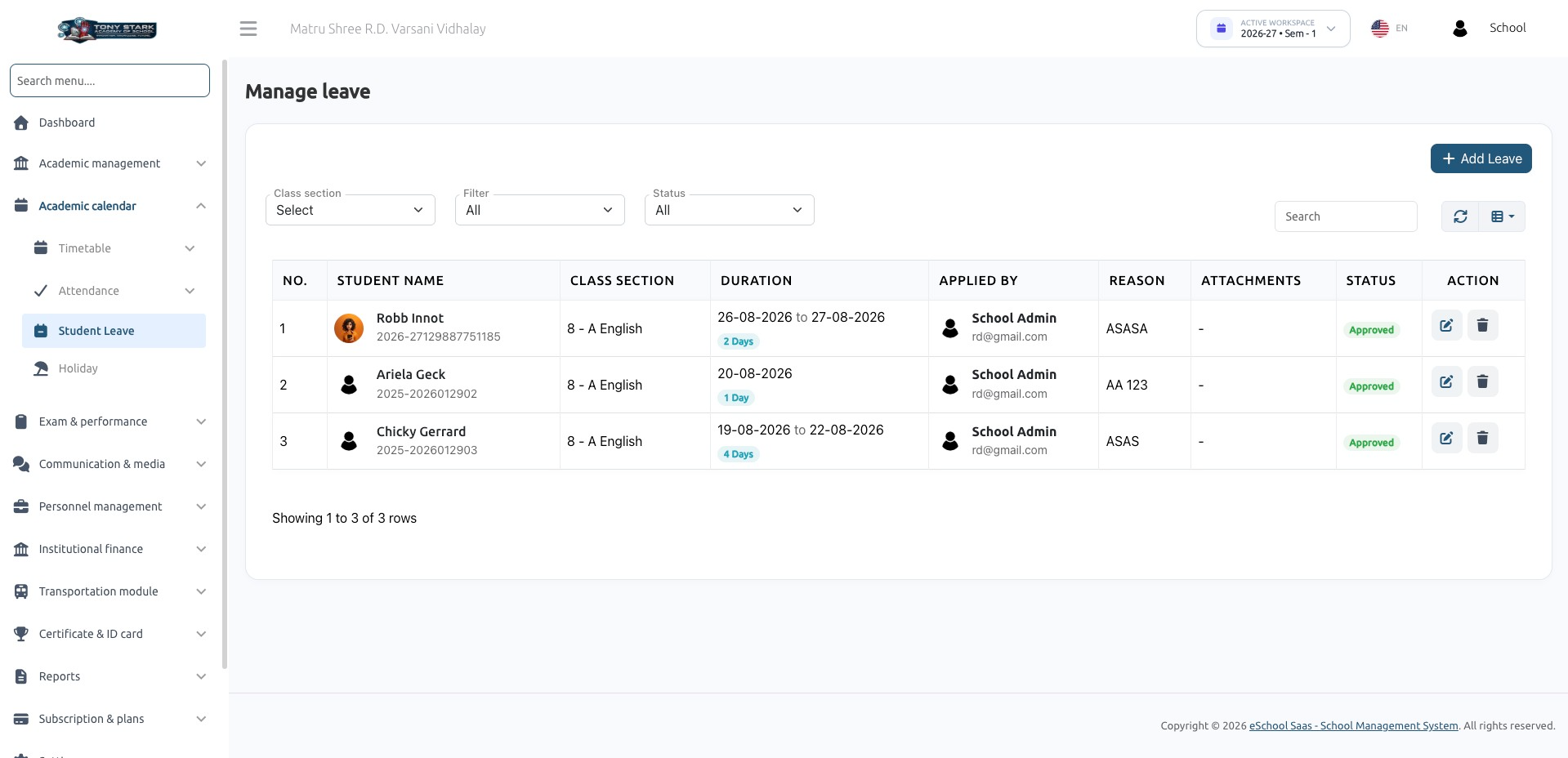
Parents apply for their child's leave from the mobile app; the school admin or the class teacher approves or rejects it; an approved leave writes itself into the student's attendance as Leave. School staff can also record a leave directly from the web, which is approved on the spot.
1. Who does what
| Actor | Can |
|---|---|
| Parent / Guardian (app) | Apply for a linked child, view that child's leave history, cancel a request while it is still Pending |
| School Admin (web) | See every student's leave, add a leave (auto-approved), edit dates/reason, approve / reject / re-open, delete |
| Class Teacher (web / staff app) | Same as admin but limited to the students in their assigned class sections, and only for leaves still Pending — once granted the permission by the admin toggle |
Any staff with student-leave-approve (staff app) | List and decide leaves through the staff API |
2. Leave status
leaves.status holds a single integer:
| Value | Meaning | Set by |
|---|---|---|
0 | Pending | Parent application from the app |
1 | Approved | Admin/teacher decision, or a web-side leave entry (auto-approved) |
2 | Rejected | Admin/teacher decision. Requires a note |
The web list badges these as pending (yellow) / approved (green) / rejected (red).
Related columns on leaves:
| Column | Purpose |
|---|---|
user_id | The student's user id (not students.id) |
added_by | Who created the request — the guardian, the teacher or the admin |
reason | Why the leave is being taken (required everywhere) |
note | The rejection reason / decision note. Required when rejecting |
from_date, to_date | Inclusive range |
leave_master_id | Ties the leave to the leave settings of the session year |
leave_details carries one row per leave day (type = 'full_day'), which is what the list uses to count days.
3. Prerequisites
| # | Requirement | Where |
|---|---|---|
| 1 | Student Leave Management feature active in the school's package | Super Admin → Package |
| 2 | A Leave Master record for the current session year | Leave settings. Without it, both the app and the web refuse: "Leave master settings not configured for current session year" |
| 3 | Permissions granted to the roles that need them | Roles & permissions |
| 4 | For class teachers: the Teacher Student Leave Permissions toggle turned on | School Settings → Advanced |
| 5 | The child must be linked to the guardian (students.guardian_id) for the app flow | Student master |
Permissions
| Permission | Guards |
|---|---|
student-leave-list | The web Manage Leave screen, its data endpoint, and GET /api/staff/student-leave |
student-leave-create | Adding a leave from the web |
student-leave-approve | Approve / reject / edit, delete, and POST /api/staff/student-leave/update-status |
reject-student-leave | Seeded but not used by any code — rejection is covered by student-leave-approve |
The teacher toggle
School Settings → Advanced → Teacher Student Leave Permissions.
Turning it on loops over the class_teachers records and grants student-leave-approve, student-leave-list and student-leave-create directly to each of those teacher users (a per-user grant, not a role-level one), and stores teacher_student_leave_permissions = 1 in the school settings. Turning it off revokes the same three permissions from the same set of users.
Two consequences worth knowing:
- The grant is a snapshot. A teacher made a class teacher after the toggle was switched on does not get the permissions automatically — toggle it off and on again, or grant the permissions to that user directly.
- The loop reads every
class_teachersrow without filtering by session year, so teachers from earlier session years are included as well.
4. Flow A — Parent applies from the app
POST /api/parent/student/leave
- Parent picks the child, the date range, types a reason, optionally attaches documents.
- The server validates and refuses in these cases:
| Check | Message |
|---|---|
from_date earlier than today | "Leave cannot be applied for past dates." |
to_date before from_date | "To date must be after or equal to from date." |
| The child is not linked to this guardian | "This child is not linked to your account." |
| No leave master for the session year | "Kindly contact the school admin to update leave settings…" |
| Dates outside the session year | "Selected leave dates must fall within the current academic session year (start to end)." |
| An overlapping non-rejected leave already exists | "A leave request already exists for this child during this period." |
| Every day in the range is a holiday | "Leave cannot be applied as all selected dates in the range are holidays." |
- Holidays are skipped. Each date in the range is checked against the public holidays of the session year and the weekly holidays configured on the leave master (
leave_masters.holiday, a comma-separated list of day names). Only the remaining dates becomeleave_detailsrows. - The leave is created with
status = 0(Pending) andadded_by= the guardian's user id. - Attachments (
jpg, jpeg, png, pdf, doc, docx, size capped by the systemfile_upload_size_limitsetting and scanned by theSafeUploadrule) are stored as morphfilesrows. - Everyone holding
student-leave-approvegets a push notification titled "[Guardian] has submitted a leave request for [Student]." with the reason as the body.
Nothing touches attendance at this point — a pending leave has no effect on the register.
Viewing and cancelling
GET /api/parent/student/leavereturns that child's leaves for the current session year, newest first, each with itsleave_detailrows, attachments and a computedtotal_days.POST /api/parent/student/leave/canceldeletes the request outright (details, files and the leave row) — only while it is still Pending. Once approved or rejected, the parent cannot cancel it.
5. Flow B — Staff adds a leave from the web
Academy Calendar → Student Leave → Add Leave, needs student-leave-create.
The form asks for class section → student → from/to date (d-m-Y) → reason.
Server side (store in app/Http/Controllers/StudentLeaveController.php:167):
- A teacher may only add a leave for a student in one of their own class sections.
- Dates must sit inside the session year,
to_date≥from_date, and must not overlap an existing non-rejected leave for that student. - The leave is created already approved (
status = 1) — there is no review step for a leave entered by staff. - One
leave_detailsrow is created for every date in the range — this path does not skip weekly or public holidays the way the parent API does. - Attendance is written straight away: every day in the range is upserted as
type = 2(Leave) with the remark "Leave approved by [name]". - The student and the guardian get a "Leave Added and Approved" notification.
The controller accepts an optional files[] upload (jpg/jpeg/png/pdf/doc/docx, 5 MB), but the current Add Leave modal has no file field — attachments in practice come from the parent app.
6. Flow C — Reviewing a request
From the web
Manage Leave lists every leave for the current session year with filters for class section and status, and a search over reason, note, dates, student name and applicant name. A teacher only ever sees the leaves of students in their own class sections.
The edit action opens a modal carrying from/to date, reason, status (Pending / Approved / Rejected) and a rejection-reason box that appears when Rejected is picked. It posts to student-leave.update-status (updateStatus in app/Http/Controllers/StudentLeaveController.php:323, needs student-leave-approve).
What it enforces:
- A teacher can only act on a leave that is still Pending ("This leave has already been decided and cannot be changed by a Teacher"), and only for a student in their class sections. A school admin can change a decided leave.
noteis required when the status is Rejected.- The new range must not overlap another non-rejected leave of the same student.
What it does:
- Saves the new dates, reason, note and status.
- Deletes and re-creates the
leave_detailsrows for the new range (again, every calendar day — holidays are not skipped here). - Rewrites attendance (see §7).
- Notifies the student and the guardian — approval or rejection, with the note appended to a rejection.
From the staff app
GET /api/staff/student-leave— paginated list for the current session year, with optionalclass_section_idandstatusfilters (per_pagedefault 15).POST /api/staff/student-leave/update-status—leave_id,status(1or2only — this endpoint cannot re-open a leave to Pending),noterequired when rejecting.
Note that neither staff endpoint restricts the caller to their own class sections: any user holding student-leave-list / student-leave-approve sees and can decide every student's leave through the API, unlike the web screen which scopes teachers to their sections.
Deleting
The delete action (destroy in app/Http/Controllers/StudentLeaveController.php:502, needs student-leave-approve) removes the attachments, the daily detail rows and the leave itself. Attendance is only cleaned up when the leave is entirely in the future (from_date > today); deleting a past or in-progress approved leave leaves its type = 2 attendance rows behind, which then have to be corrected from the attendance screen.
7. Attendance synchronisation
Attendance rows are unique per class_section_id + student_id + session_year_id + date, and attendances.type means 0 = Absent, 1 = Present, 2 = Leave.
| Action | Effect on attendance |
|---|---|
| Parent applies (Pending) | Nothing |
| Staff adds a leave from the web | Every day upserted as type = 2 with a remark |
| Web decision → Approved | Old date range's type = 2 rows deleted, then the new range upserted as type = 2 |
| Web decision → Rejected or back to Pending | Old date range's type = 2 rows deleted (the days go back to having no record) |
| Staff API decision → Approved | New range upserted as type = 2 |
| Staff API decision → Rejected | Existing type = 2 rows in the range flipped to type = 0 (Absent) — not deleted |
| Delete a future leave | type = 2 rows in the range deleted |
| Delete a past/current leave | Attendance untouched |
The web and the staff API therefore treat a rejection differently: the web removes the record, the API marks the student absent. Pick one path consistently for a given school, or expect the two to leave different traces.
Because deletion and re-creation are keyed on type = 2, a day a teacher has since marked Present or Absent by hand is never overwritten by a leave decision.
8. Notifications
All notifications go through send_notification(..., 'student_leave'), so the app can route them by type. The approval / rejection payload also carries child_id (the student's user id) as custom data.
| Event | Recipients | Message |
|---|---|---|
| Parent applies | Everyone with student-leave-approve | "[Guardian] has submitted a leave request for [Student]." + the reason |
| Staff adds a leave | Student + guardian | "Leave Added and Approved" |
| Approved | Student + guardian | "Your leave request from [from] to [to] has been approved." |
| Rejected | Student + guardian | "Your leave request from [from] to [to] has been rejected." + the note |
9. API reference
Parent (guardian token, checkChild middleware)
| Method | Endpoint | Body |
|---|---|---|
| POST | /api/parent/student/leave | child_id (students.id), reason, from_date (≥ today), to_date (≥ from_date), files[] optional |
| GET | /api/parent/student/leave | child_id |
| POST | /api/parent/student/leave/cancel | leave_id, child_id — Pending only |
Staff / teacher
| Method | Endpoint | Body / query |
|---|---|---|
| GET | /api/staff/student-leave | class_section_id optional, status optional (`0 |
| POST | /api/staff/student-leave/update-status | leave_id, status (1 = approve, 2 = reject), note required when status = 2 |
Both groups need Authorization: Bearer {token} and the school-code header, and both sit behind the Student Leave Management feature check.
child_id in the parent API is students.id, while leaves.user_id stores the student's users.id — the controllers translate between the two.
Web routes
| Method | Route | Name |
|---|---|---|
| GET | student-leave/ | Student-leave.index |
| GET | student-leave/show | student-leave.show (bootstrap-table data) |
| POST | student-leave/store | student-leave.store |
| POST/PUT | student-leave/update-status | student-leave.update-status |
| DELETE | student-leave/student-leave/{id} | student-leave.destroy |
10. Data model
| Table | Role |
|---|---|
leaves | The request: user_id (student user), added_by, reason, note, from_date, to_date, status, leave_master_id, school_id |
leave_details | One row per leave day (date, type = 'full_day') |
leave_masters | Per-session-year leave settings — allowed leaves and the weekly holiday day list |
attendances | Where an approved leave lands as type = 2, unique per class section + student + session year + date |
files (morph) | Supporting documents attached to a leave |
holidays | Public holidays used to skip days in the parent flow |
class_teachers | Drives both the teacher's visibility scope and the permission toggle |
added_by and note were added to leaves in database/migrations/schools/2026_08_13_160000_version_1_11_0.php:265, which also de-duplicated attendances and added the unique daily-record index the leave sync depends on.
The same leaves table also stores staff leave. Every student-leave query filters with whereHas('user', fn($q) => $q->has('student')) so the two never mix; the staff API additionally refuses a non-student record with "This is not a student leave record."
11. Troubleshooting
| Symptom | Cause / fix |
|---|---|
| "Leave master settings not configured for current session year" | Create the leave master record for the active session year |
| Menu item missing | The user has none of student-leave-list / student-leave-create / student-leave-approve, or the package lacks the Student Leave Management feature |
| Class teacher cannot approve | The Teacher Student Leave Permissions toggle is off — or the teacher became a class teacher after it was switched on; re-toggle it |
| Teacher gets "This leave has already been decided…" | Teachers can only act on Pending leaves; a decided leave has to be changed by an admin |
| "A leave request already exists for this child during this period" | An overlapping Pending or Approved leave exists. Reject or delete it first — rejected leaves do not block |
| Parent cannot cancel | Cancel only works while the leave is Pending |
| Approved leave not showing in attendance | The student needs a class_section_id; also check that no manual Present/Absent record for that day was created after the approval on a different type |
| Attendance still shows Leave after deleting | Expected for a past or in-progress leave — attendance cleanup on delete only runs for a leave entirely in the future |
| Leave counted on a Sunday / public holiday | Only the parent app skips holidays. A leave added or edited from the web covers every calendar day in the range |
| Attachment upload rejected | Allowed types are jpg, jpeg, png, pdf, doc, docx; the size ceiling is the system file_upload_size_limit setting (web path caps at 5 MB) |